
Google Forms is one of the most popular form-building tools out there — it’s free, easy to use, and everyone already has a Google account. But when it comes to professional event management, relying on Google Forms can become a hidden cost that wastes your time and damages your brand.
Let’s explore why most event organizers are making the switch to dedicated Event Registration Systems — and what limitations you need to know about before your next event.
💡 Spoiler: If you still want to use Google Forms, that’s okay — Happenn can work alongside it. More on that at the end.
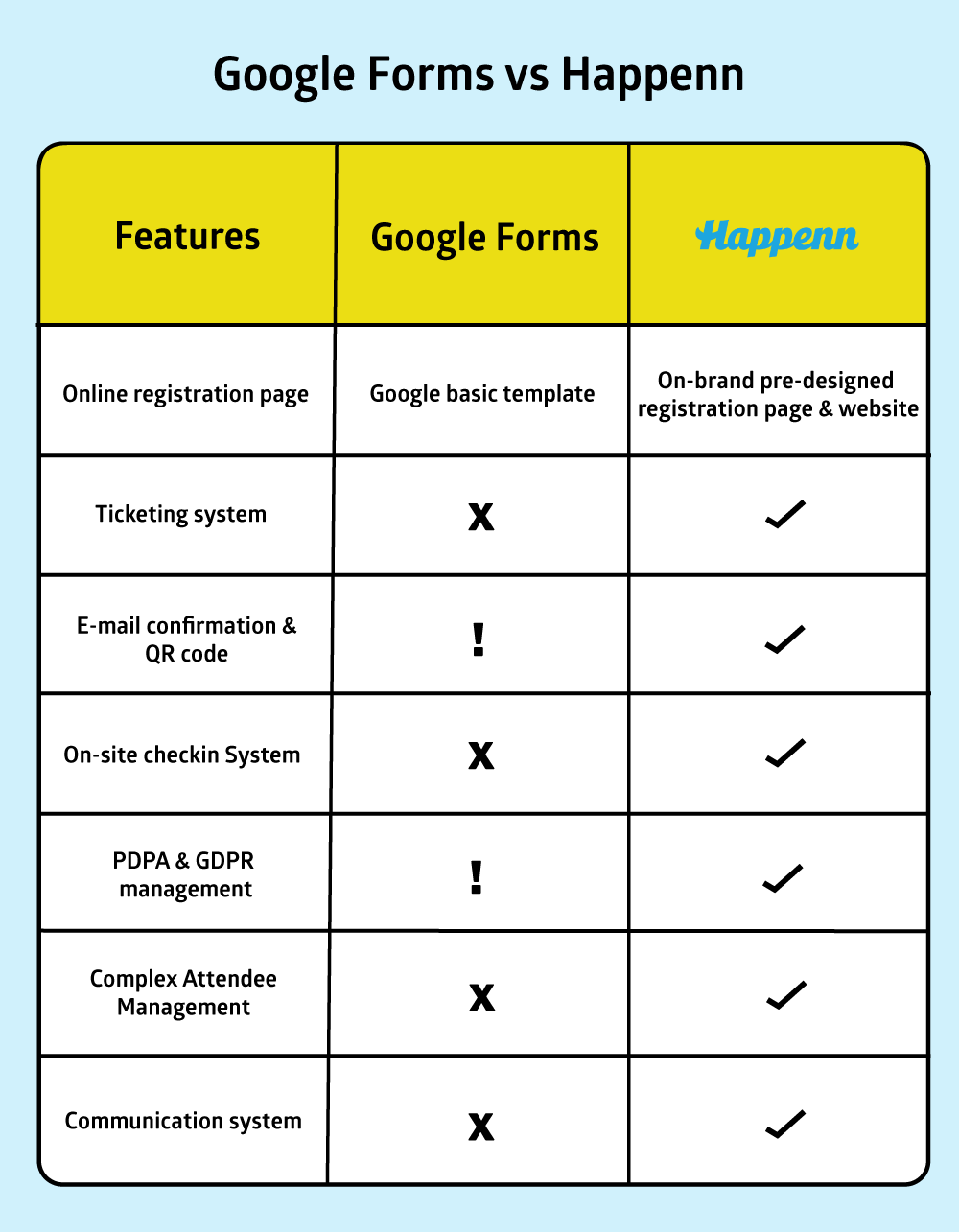
Google Forms does one thing: collect responses. That’s it. There’s no automatic confirmation email with event details, no QR code generation for check-in, no badge printing, no waitlist management, and no session selection.
For a 50-person workshop, you might manage. But for a 500-person conference with VIP tiers, multiple sessions, and fast on-site registration — Google Forms will make you look unprofessional.
Google Forms can restrict responses to your Google Workspace users and limit to one response per person — which is an improvement. But if your event includes external guests like partners, sponsors, or press, there’s no way to verify who’s actually registering
You can’t do true “Invite-only” registration. You can’t upload a list of 100 emails and say “only these people can register.” Anyone with the link can fill it in.
💡 For internal events, Google Forms works well. For professional events requiring guest management, a dedicated platform like Happenn closes the verification gap entirely.
Registration doesn’t end when someone submits a form. At the actual event, you need check-in, badge printing, and attendee tracking. If your event has 100+ people, organizers relying on Google Forms end up printing spreadsheets and manually ticking names — creating long queues and a terrible first impression.
Happenn’s Solution: Our on-site check-in app scans a QR code and pulls up the attendee’s name instantly, with badge printing in under 5 seconds. First impressions matter.
For international events requiring GDPR compliance (EU data standards), Google Forms falls short: no built-in consent management, no easy way to process deletion requests across sheets, and no clear audit trail of who accessed what data.
Happenn’s Solution: Happenn is built specifically for both PDPA and European GDPR compliance, with clear consent management and a full access log.
If your event sells tickets, using Google Forms means asking attendees to transfer money manually, then verifying each slip by hand. This is error-prone and time-consuming.
Happenn’s Solution: Happenn connects directly to payment processing. Once payment is complete — via credit card, PromptPay, or other options — the system issues a receipt and ticket automatically, 24/7. No manual work for your accounting team.
You might think Google’s infrastructure can handle anything. In reality, Google Forms has lower concurrent submission limits than you’d expect.
When hundreds or thousands of people try to register simultaneously — like opening ticket sales for a concert or marathon — users hit timeouts, forms freeze, and submissions get lost. Google Forms routes data through Google Sheets, which can experience latency spikes under high load, causing missed registrations or duplicate entries.
Happenn’s Solution: Happenn’s architecture is built for high-traffic events with load balancing and a high-performance database designed to handle registration spikes in real time.
💡 A “free” form comes with hidden costs: the opportunity cost of a crashed or slow system far outweighs any platform fee. It damages your brand’s credibility instantly.

For conferences with multiple breakout rooms or capacity-limited workshops, Google Forms simply can’t manage real-time seat availability. Once a room fills up, there’s no automatic way to close registration for that session.
Happenn’s Solution: Happenn’s slot management automatically closes registration for a session the moment it’s full, preventing overbooking entirely.
After someone registers, you need to communicate: confirmations, schedule updates, reminders, post-event surveys. Google Forms has no built-in communication system. You’re forced to use separate tools for email and SMS, manually exporting and importing data each time.
Happenn’s Solution: Happenn includes built-in communication tools that automate messaging based on registration data already in the system — no imports or exports needed.
Google Forms wasn’t designed with repeat events in mind. There’s no event history, no returning attendee tracking, no CRM-style view of long-term relationships. Every event means rebuilding your form, reconnecting integrations, and recreating workflows from zero.
For organizations that run annual conferences, quarterly meetups, or monthly webinars, this lack of continuity wastes enormous time and valuable data insights.
Happenn’s Solution: Happenn’s real-time analytics dashboard shows check-in rates, company breakdowns, and top spenders — instantly. Carry insights from one event into the next.
Q: Is Google Forms really free? What are the limitations?
Google Forms is free for basic data collection. However, features like response limits, automated confirmation emails, or QR check-in require third-party add-ons — some of which cost money and aren’t always reliable.
Q: How many respondents can Google Forms handle?
There’s no official cap, but in practice, when many people submit simultaneously — like opening ticket sales — the system often experiences latency or timeout errors.
Q: Does Google Forms violate PDPA?
Google Forms itself isn’t illegal, but using it without proper consent management, audit logs, or a Data Processing Agreement (DPA) for overseas data storage creates PDPA risk for your organization.
We understand some projects have existing system constraints. You can keep using Google Forms to collect data, then sync it into Happenn to use just the check-in and badge printing system on-site. It’s an affordable way to immediately make your event look more professional.
Want to elevate your events to the next level?
Let Happenn handle registration and on-site check-in so you can focus on creating the best possible experience for your attendees.


